
Preview
Building own blog is benefitial for seeking a job, especially a CS related job. It records your achievements and reflects your learning journey. In addition, you can use blog to share your ideas and make friends. This post shares my experience establishing the blog website.
Prerequisite
- Node.js is installed
- JavaScript Knowledge is required
- Git
Install Hexo
Hexo is a fast, simple and powerful blog framework, which helps you establish a blog website in a short time.
In windows terminal, using npm to install hexo.
npm install hexo-cli -gInitialize Hexo
After installation, we can start to build the first blog website. In the terminal, direct to the folder you want to store the website. Then, type the following command.
hexo init yourFolderNameThis will take seconds to initialize the hexo folder.
Introduction of Hexo Framework
Hexo provides a clear stureture for users. they can customize some components without interupting others.
There are four marjor components: scaffolds, source, themes and _config.yml.
scaffolds
It provides the template of draft, post and page. These templates can be modified to fit your own style. Also, your can build new template.

source
This contains your blog content, and you will spend most of time on it.
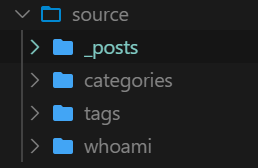
To create create new content, direct to your root directory of Hexo folder and type following code in terminal.
hexo new yourFileNameBy default, hexo will create a post in source/_posts folder.
To create other types of content (draft or page), specify the type after new.
- Create a post
hexo new post yourPostName- Create a draft
hexo new draft yourDraftName- Create a web page
hexo new page yourPageNameThe content should be written in Markdown Language
All types should correspond to the type name in scaffolds.
themes
This folder contains front-end code. You can cutomize your own theme or use themes from Theme Market.
You can change your theme in config.yml.
_config.yml
this file stores configuration of your entire blog website, such as your blog name.
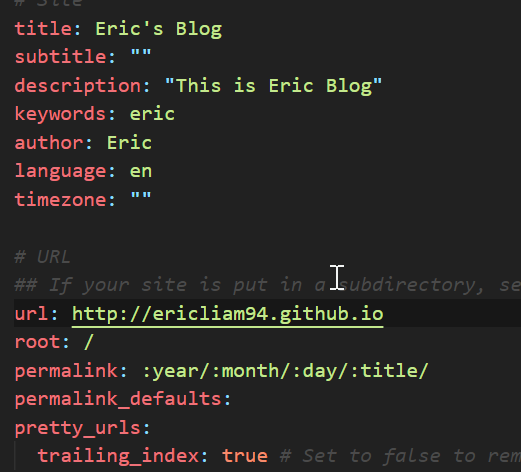
Hosting your website
Create a new repository in Github
The repository name should strictly follow the structure of yourGitHubName.github.io
For me, my github name is EricLiam94, so my repository name would be EricLiam94.github.io

Link to your github
In your _config.yml file, fill the deploy session as following.

you can directly copy the repo from your github repository:
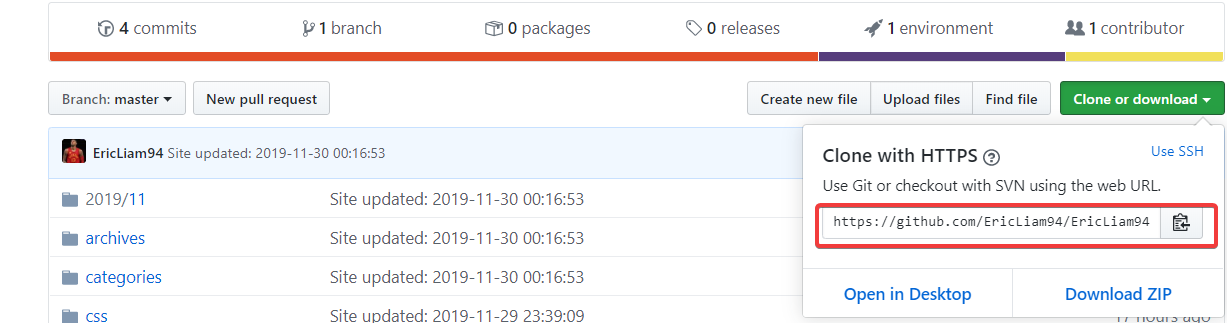
install hexo-deployer-git and depoly your site onto Github
First, we need to install hexo-deployer-git .
npm install hexo-deployer-git --saveAfter installation, we can start to depoly our website.
    hexo clean
    hexo generate
    hexo deploy
Finally, we create our first blog website. To visit the website, just input the repository name as url address. Also you can replace the domain with your own domain in Repository setting and use CNAME to reference it.
